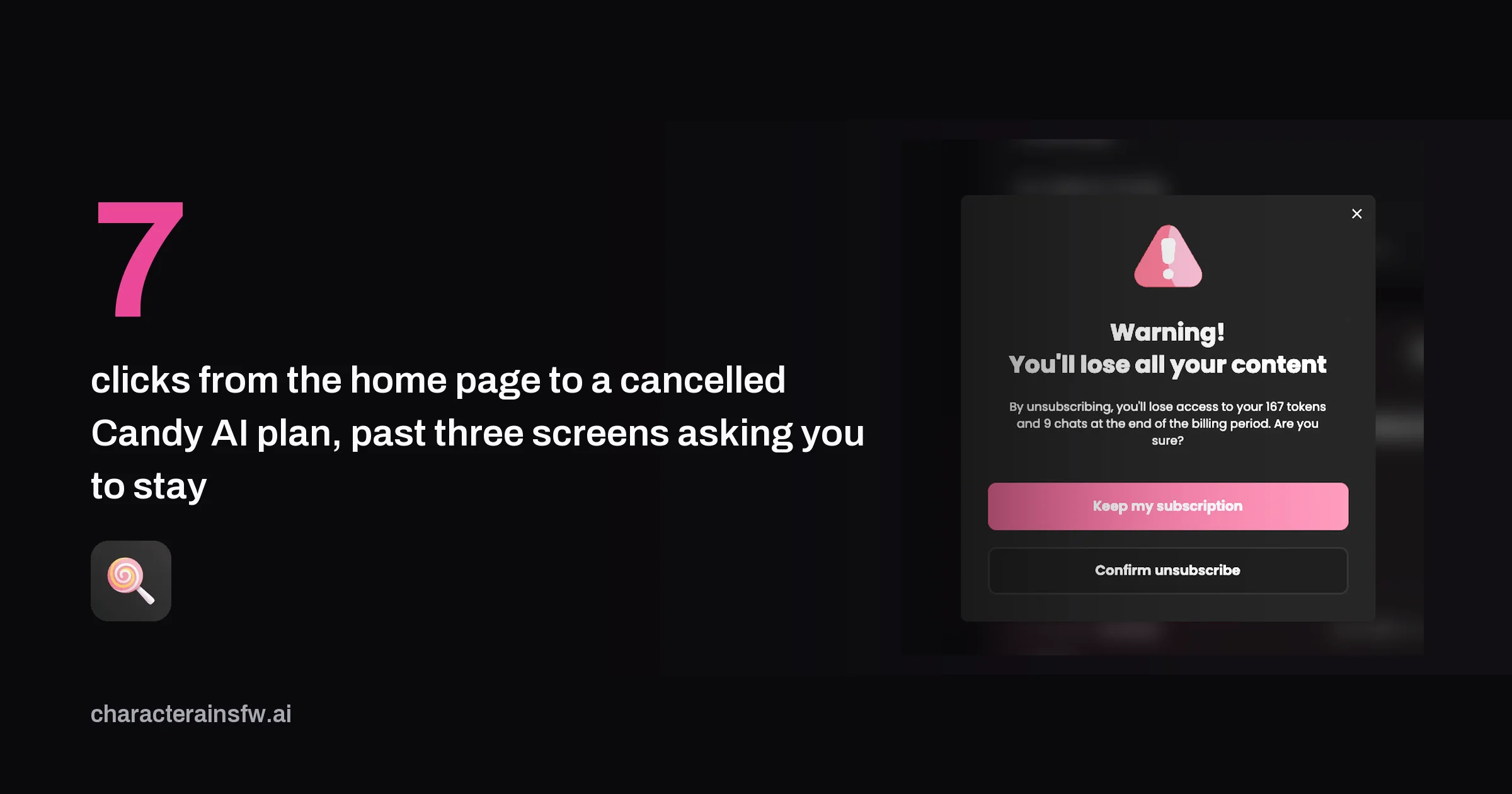
How to cancel Candy AI, step by step
We paid for Premium on 22 September 2026 and cancelled it the same day. We walked the path on desktop and on a phone, and both were identical. Here is every click.
| Click | Where | What to press |
|---|---|---|
| 1 | Any page | Your avatar, top right |
| 2 | Avatar menu | Settings |
| 3 | Settings, Current Plan | Unsubscribe, the small grey link at the bottom |
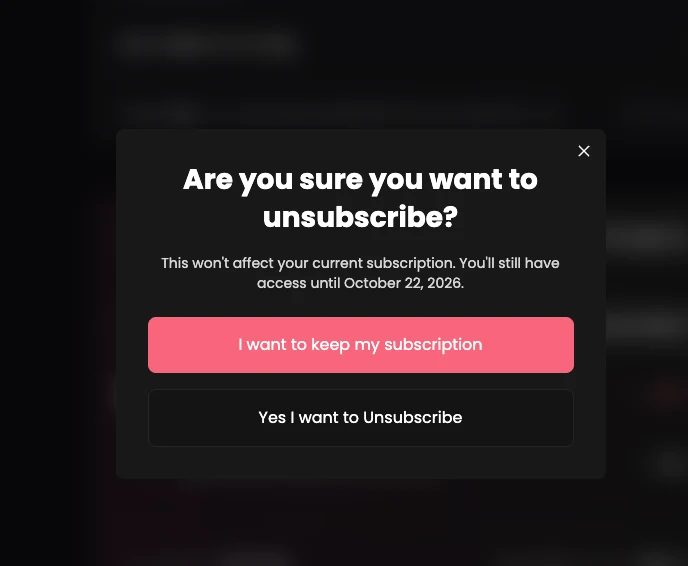
| 4 | Are you sure? | Yes I want to Unsubscribe |
| 5 | Why are you unsubscribing? | Any one reason |
| 6 | Why are you unsubscribing? | Confirm |
| 7 | Warning | Confirm unsubscribe |
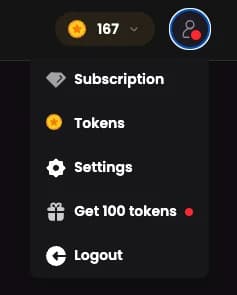
The avatar menu has a Subscription entry, and it is the wrong one. The cancel link lives under Settings, at the bottom of the Current Plan block, below the payment date and the renewal date.
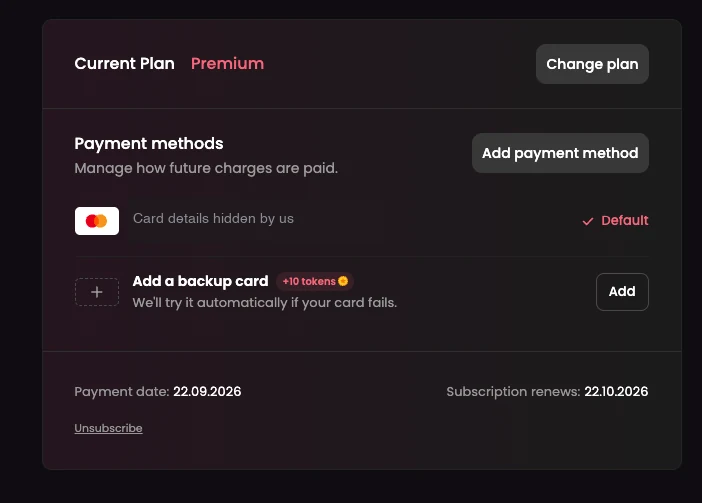
The three Candy AI screens that ask you to stay
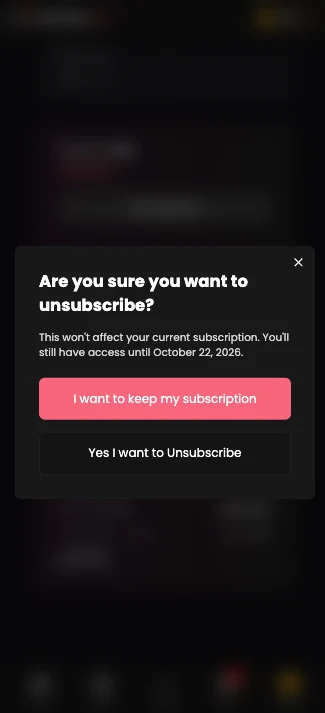
After the link come three windows in a row. None of them offered us a discount. Each one puts the button to keep the subscription first, in pink, and the button to leave second.
| Window | Pink button | Button that cancels |
|---|---|---|
| Are you sure you want to unsubscribe? | I want to keep my subscription | Yes I want to Unsubscribe |
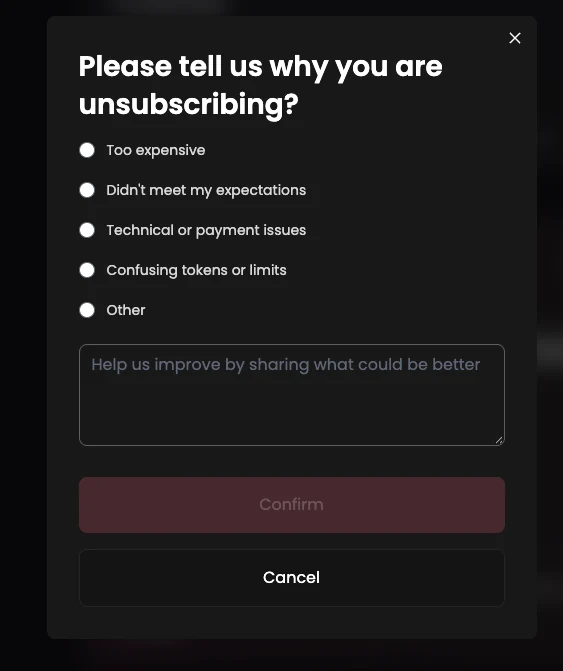
| Please tell us why you are unsubscribing? | None: Confirm stays greyed out until you pick a reason | Confirm |
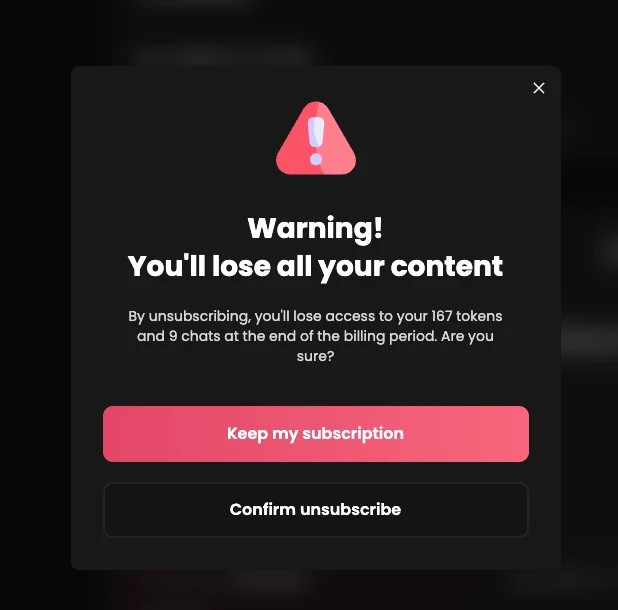
| Warning! You'll lose all your content | Keep my subscription | Confirm unsubscribe |
The survey offers five reasons: too expensive, did not meet expectations, technical or payment issues, confusing tokens or limits, and other. The text field is optional. The reason is not.
What you keep and lose after cancelling Candy AI
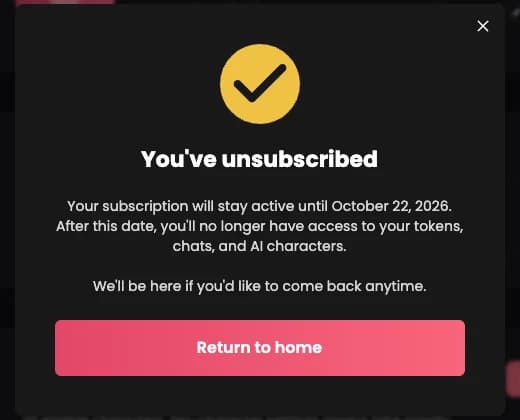
Cancelling stops the renewal, not the plan you paid for. The confirmation said our access would run until 22 October 2026, the renewal date shown in Settings. After that date, it says, you lose access to your tokens, your chats and your AI characters.
| What | What we saw |
|---|---|
| Confirmation email | None received, checked on 22 September 2026 |
| Tokens left | 167, lost at the end of the paid period (terms, art. 10.2: not carried over, not refunded) |
| Chats | 9, lost at the end of the paid period, per the warning window |
| Access until | The end of the period already paid |
Two things follow. Spend your tokens before the end date, because nothing gives them back. And keep a capture of the confirmation window with its date: with no email, it is the only record you will have if a renewal goes through anyway.
Candy AI refund rules, from its terms
Cancelling and getting a refund are separate things. We did not ask for a refund, because the terms say it cuts access at once. What follows is the text of the Candy AI terms of service, revision of 17 August 2026. We read section 10 again on 23 September 2026, in the revision of 22 September, and it had not changed.
| Case | Deadline | Conditions |
|---|---|---|
| Subscription (art. 10.4.1) | 24 hours after payment | Refused if more than 20 tokens were used, or for a technical problem on your side. Card payments only. |
| Token purchase (art. 10.4.2) | 24 hours after payment | Refused if the tokens were used. Card payments only. |
| EU and UK withdrawal (art. 10.4.3) | 14 days after the purchase confirmation email | First purchase only, not renewals. Refunded pro rata to what you used, within 14 days. By email to support@candymail.ai, with the model form at the bottom of the terms. |
A refund or a chargeback ends Premium and your tokens immediately (art. 10.2). So a refund request is a way to stop now and get money back, while unsubscribing is a way to stop later and keep what you paid for. Choose one knowingly.
For most people outside the EU and UK, the window is the 24 hours after a payment. Past that, the terms offer nothing, and the practical move is to unsubscribe and use what is left.
Charged by Candy AI after you cancelled
Check the statement first. Candy AI's subscription page says the charge shows as EverAI, the operator named in its terms, so a line you do not recognise may be this one.
Then write to support@candymail.ai with the date you cancelled and your capture of the confirmation window. If you are in the EU or UK and it was your first purchase, name article 10.4.3 of the terms.
We keep a forum thread for exactly this, across every platform: Charged after you cancelled? Start here. Post the platform, the date you cancelled, the screen you cancelled from and what your statement reads. If a refund path worked for you, that is where it helps the next person.
For what the platform is like before you pay, read our Candy AI review, and for how the price compares, our AI girlfriend pricing guide.
Frequently asked questions about cancelling Candy AI
Can I cancel Candy AI from the mobile browser?
Yes. We ran the same path on a phone on 22 September 2026 and it matched the desktop one screen for screen: avatar, Settings, Unsubscribe, then the same three windows.
Does deleting my Candy AI account cancel the subscription?
We did not test it, so we will not say it does. Unsubscribe from Settings first, capture the confirmation, and only then decide about the account.
Who is behind Candy AI, if I need to write to them?
The terms name EverAI Limited, registered in Malta under number C107181, and put the terms under Maltese law and the courts of Malta. Refund and withdrawal requests go to support@candymail.ai.
What is the backup card on the Candy AI settings page?
Settings offers 10 tokens for adding a second card, which the platform says it will try automatically if your main card fails. If you are about to cancel, there is no reason to give it a second card to charge.
Back to the ranking
Best AI girlfriend apps
17 platforms tested and ranked on 6 criteria